
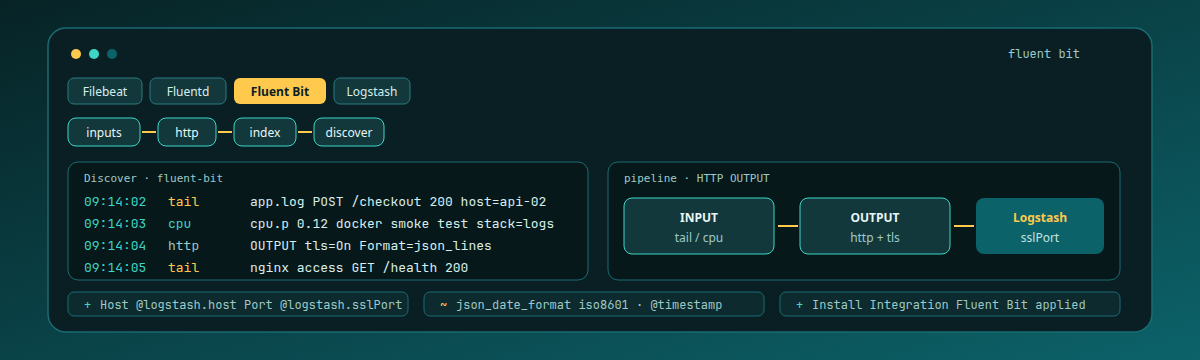

Fluent Bit is the small C shipper you mount into Linux hosts and containers when you want HTTP (or TCP) output to Logstash without hauling a Ruby collector. The first useful win on Logit.io is not a plugin tour. It is one fluent-bit.conf, the Logstash SSL endpoints from Install Integration, and log lines you can find in OpenSearch Dashboards Discover under this stack's index pattern.
Contents
When Fluent Bit beats Fluentd and Filebeat
Fluentd is the heavier Ruby collector with its own gem ecosystem. Logit keeps it on a separate page: Fluentd configuration. A Fluentd @type logit block will not parse as Fluent Bit. Filebeat is still the right single-purpose choice when you only harvest files with Elastic Beats YAML. Choose Fluent Bit when the binary size, container mount, and HTTP OUTPUT matter more than Beats modules.
This journey is also not the Kubernetes Filebeat DaemonSet path. Here the shipper is Fluent Bit, the destination is a Logit Logs stack over Logstash SSL, and the proof is Discover showing the logs you just generated.
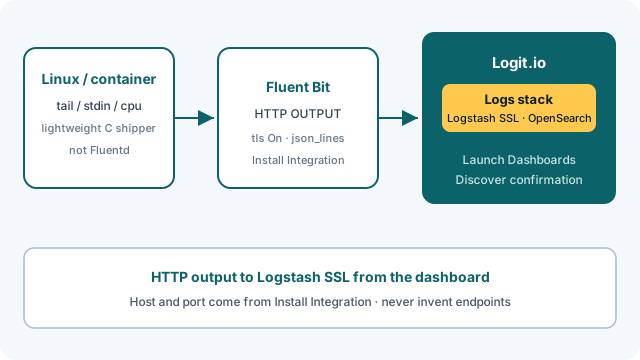
Bind Logstash host and SSL port to this stack
Sign in at the Logit.io dashboard and create a Log Management stack. That gives you managed Logstash, OpenSearch, and Dashboards. Log Management getting started covers the stack shape; Account and stack covers account setup if the dashboard is new.
From the stack overview, open Install Integration and choose Fluent Bit (or click Install Integration on the Fluent Bit docs page). That step binds @logstash.host and @logstash.sslPort to this stack. Endpoints copied from a Filebeat ticket, a Wazuh trial, or another team's account will send you into a quiet Discover view that looks like a Fluent Bit bug.
Every key in the HTTP OUTPUT block
The documented config-file path on Fluent Bit configuration is an [OUTPUT] block. Quote it as the docs ship it, then replace the placeholders with Install Integration values:
[OUTPUT]
    Name http
    Match *
    Host @logstash.host
    Port @logstash.sslPort
    tls On
    Format json_lines
    json_date_format iso8601
    json_date_key @timestamp
Name http selects the HTTP output plugin. Match * sends every tagged record that reaches this output; tighten the match later if you add routes. Host and Port must be the Logstash SSL endpoint for this stack, not a guessed hostname and not the OpenSearch port.
tls On is required for Logit Logstash SSL. Leaving TLS off is a frequent miss: Fluent Bit can look healthy locally while Logstash refuses the connection. Format json_lines is the documented line format. Do not swap it for a plain json blob format and assume Logstash will accept the same framing. json_date_format iso8601 and json_date_key @timestamp control how the timestamp is serialized. Wrong date key or format often shows up as documents missing from the time window you are staring at in Discover.
Mount the conf into the official image and run with -c, as the same docs page shows:
docker run -v /path/to/your/fluent-bit.conf:/fluent-bit/etc/fluent-bit.conf -it fluent/fluent-bit:3.1.9 /fluent-bit/bin/fluent-bit -c /fluent-bit/etc/fluent-bit.confPair that OUTPUT with one INPUT you trust for a first log proof: a tail on a known application log, or stdin while you write a marker line. The first pass is one Match that reaches Logstash with real log content, not a full filter graph.
The docs also publish a Docker one-liner that uses -i cpu over TCP SSL with the same format=json_lines, tls=on, json_date_format=iso8601, and json_date_key=@timestamp settings. That proves network reachability to Logstash when you do not want a conf yet. It is a connectivity check, not your first logs proof. Day-to-day shipping belongs in fluent-bit.conf with the HTTP OUTPUT above and a log INPUT.
Unlock complete visibility with hosted ELK, Grafana, and Prometheus-backed Observability
Prove the log line in Discover
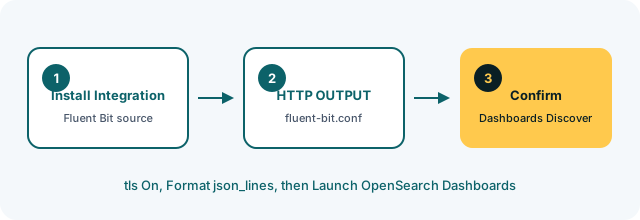
Back on the stack, use Launch OpenSearch Dashboards (the step on the Fluent Bit docs after the sample config). Open Discover and select the index pattern this Log Management stack created. An old Filebeat pattern from another trial will not show Fluent Bit documents even when ingestion is working.
Set the time picker to Last 15 minutes. That window is what Getting started with OpenSearch Dashboards calls out for troubleshooting an ongoing stream. If you started Fluent Bit more than fifteen minutes ago and wrote no new lines, widen the range once, then go back to a tight window once you know data is landing.
For a first logs proof, generate a marker line in the file (or stdin stream) your INPUT reads. In Discover, search for that marker text with a free-text query the way the Dashboards getting-started page shows for raw log exploration. Filter on the host name, container name, or log path your environment actually attaches to the record so you are not mixing Filebeat noise from another stack on the same account.
Keep the optional Docker -i cpu command out of this verification. That one-liner is only for proving TCP SSL reachability. Treating it as the first logs proof sends you looking for CPU metric records instead of the application line you care about.
The OpenSearch Dashboards overview covers the UI. Rows for the source you just pointed at Logit mean the Logstash SSL leg is working.
Healthy process, empty Discover
Wrong Host or Port is still the usual miss. Re-copy Install Integration. Confirm outbound TLS to @logstash.sslPort from the host or container network. A firewall that blocks that port looks like a calm local Fluent Bit process with an empty Discover view.
Check the OUTPUT keys again against the live sample. tls Off (or omitting tls On) will not satisfy Logit Logstash SSL. Format json instead of Format json_lines changes framing even when Host and Port are correct. A mistyped json_date_key or json_date_format can push documents outside the Last 15 minutes window you are filtering on, so widen once before you decide the pipe is broken. If Fluent Bit started with a stale conf still pointing at another stack's host, Discover on this stack stays quiet no matter how many times you refresh.
Also confirm the process is reading the conf you edited. The docs mount path is /fluent-bit/etc/fluent-bit.conf with -c. Editing a different file on the host while the container still mounts an old copy is an easy way to “fix” TLS without changing what Fluent Bit loads.
If the stack stays empty after a clean conf, follow How can I diagnose no data appearing. That is the diagnosis path linked from the Fluent Bit docs.
Add a parser for the format you already ship
Once Discover shows the marker line from your tail (or stdin) INPUT over the HTTP OUTPUT path, stop adding destinations. The next useful step is parsing: keep the same Logstash SSL OUTPUT, and add a Fluent Bit parser suited to the log format you already ship so fields become searchable instead of one opaque message. Filters, Lua, Kubernetes metadata, and multi-output routing can wait until that single path is boringly reliable.
Fluentd remains a separate integration when you need that ecosystem. Filebeat remains the right Beats-native choice for file harvest without Fluent Bit's input set. Cross-check every snippet against Fluent Bit configuration before you paste. Hostnames and SSL ports are stack-specific, and they change when you rebuild the stack.