
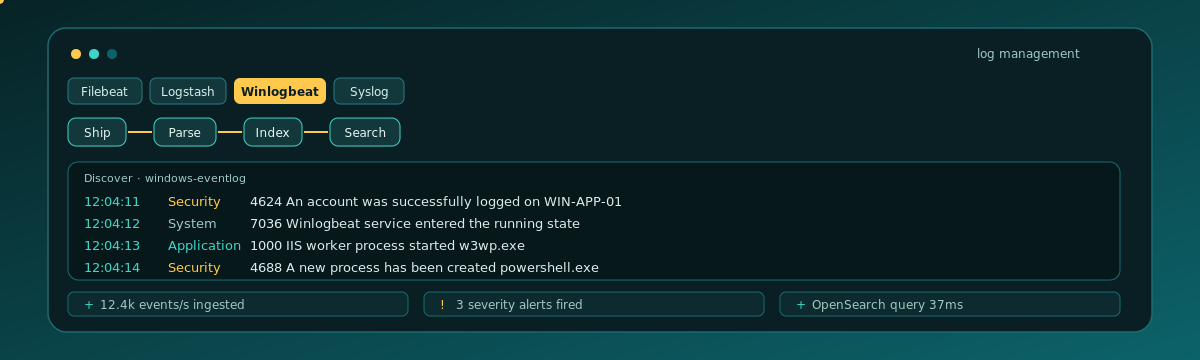

Filebeat watches files. Windows Event Log is not a file. Security, System, and Application live in the Event Log service, and Winlogbeat is the shipper that reads those channels into a Logit.io Logs stack so you can search them in OpenSearch Dashboards Discover.
Contents
A Logs stack for the host
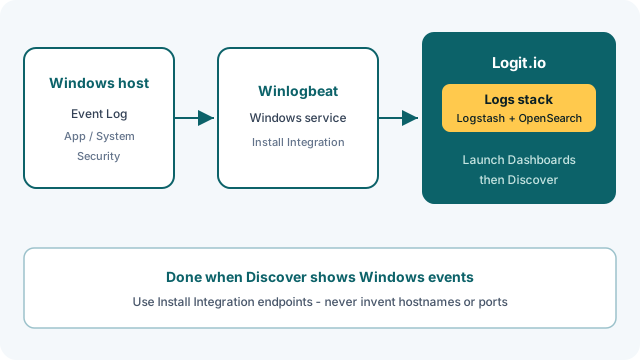
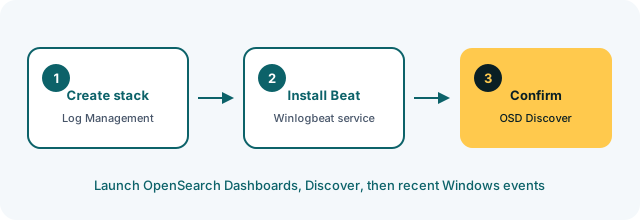
Sign in at the Logit.io dashboard and create a Log Management stack. That is managed Logstash, OpenSearch, and Dashboards. The onboarding path is Log Management getting started; Windows-specific notes sit in Getting started with Windows. Account setup is in Account and stack.
From the stack overview, open Install Integration and pick Winlogbeat so the host, SSL port, and sample config match this stack. Do not reuse endpoints from a Linux Filebeat stack you stood up last week.
Winlogbeat from the dashboard
Follow Winlogbeat configuration on the live docs. Download the Windows ZIP or MSI from the links on that page, install the service as Administrator, and replace winlogbeat.yml with the Logit.io config from Install Integration. The starter set is Application, System, and Security. That is enough to prove ingestion. Forwarded events and Sysmon can wait.
Winlogbeat has to run as a service, not a one-shot process, or you will think it “worked” in the installer and then send nothing after logoff. The docs page has the PowerShell to install, test config, and start. Run those from an elevated prompt. If execution policy blocks the script, the service never lands and Discover stays empty.
First proof is Application, System, and Security even though the Install Integration sample also lists Sysmon, PowerShell, and ForwardedEvents. Leave those extras commented out or trim them until the three channels land. Security needs the right local audit policy or you will get System and Application only, which still proves the pipe.
Validate and start the service with the PowerShell on the same docs page. Keep hosts and credentials exactly as the dashboard printed them.
If this host also has application log files, Filebeat still owns those files. See Getting started with Filebeat and Filebeat configuration when you get there. Winlogbeat does not replace Filebeat.
Unlock complete visibility with hosted ELK, Grafana, and Prometheus-backed Observability
Search in Discover
Back on the stack, launch OpenSearch Dashboards. The Winlogbeat docs include that step after the service starts. In Discover, pick a recent time range and look for the host you just onboarded. Security 4624 (logon) or System service events are easy to spot if those channels are enabled.
Getting started with OpenSearch Dashboards and the OpenSearch Dashboards overview cover the UI. Rows for that host means the pipe works.
Filter on host.name or the Windows computer name so you are not looking at Filebeat noise from another stack you already use. Event ID 4624 (successful logon) is a useful Security check if anyone has logged onto the box since Winlogbeat started. System 7036 shows up when services change state, including Winlogbeat itself.
Service up, Discover empty
Wrong Logstash host or SSL port is the usual miss. Script execution policy can also block the install. Confirm the Winlogbeat service is Running, re-copy the Install Integration block, widen Discover past the last 15 minutes, and give it a minute. The Winlogbeat docs link a “no data” diagnosis page if the stack stays empty.
Discover’s index pattern has to include the Winlogbeat documents for this stack. If you are staring at an old Filebeat index, you will not see Event Log fields. Switch to the pattern the stack created, or search for winlog.channel / event.code so you know you are in the Windows stream.
Security 4688 (new process) only shows up if process-creation auditing is on. That is a Windows policy issue, not a Logit one. Application and System still prove Winlogbeat is shipping. Once those two channels are in Discover, add Security or Sysmon on the same config page rather than installing a second agent.
Sysmon can wait
One Windows host, three channels, Discover showing events. Stop there. Domain controllers, forwarded subscriptions, and Sysmon are the same Winlogbeat page when you need them. Elastic Agent is a later unification path (Elastic Agent configuration), not a requirement for first Windows events. Cross-check snippets against Winlogbeat and Windows Winlogbeat and Telegraf setup because stack endpoints are account-specific.