
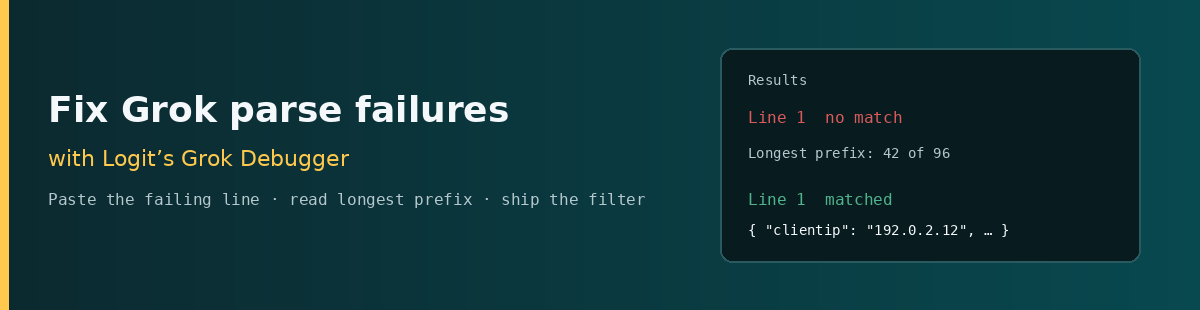

A pipeline that tags _grokparsefailure is not a pattern-library problem — it is a line-level diagnosis problem. The pattern you swore matched in a JavaScript regex tester can still fail under Logstash because Logstash expands grok with Oniguruma (via Joni), not browser RegExp. Pattern-set drift (ECS v1 vs legacy vs extras) makes that worse: a name that expands in one set is undefined in another.
This post is a practitioner walkthrough of Logit’s interactive Grok debugger: paste the failing sample, pick the same pattern set your pipeline uses, read the Results pane (no match, longest prefix, JSON captures), fix the pattern, then copy the generated filter into the Logit.io Filter Editor. It is deliberately not a grok encyclopedia — for broad pattern composition, see advanced Grok patterns in Logstash. Here the job is narrower: stop shipping broken parses.
Contents
Paste the failing line before you rewrite the pattern
Most parse failures start the wrong way: someone edits the pattern in the pipeline while staring at a partial memory of the log. Flip that. Pull one real event that already carries _grokparsefailure (or a raw line from the shipper) and treat it as the fixture. If you cannot reproduce the miss on a single line in the debugger, you are still guessing.
Commodity advice says “use COMBINEDAPACHELOG and move on.” That helps when the line is Apache combined. It fails the moment your access log has a request-time suffix, a Kubernetes probe user-agent, or a path with a query string that your hand-rolled %{URIPATH} never consumes. The counter-intuitive move: refuse to invent a new pattern until the debugger shows where the current one dies.
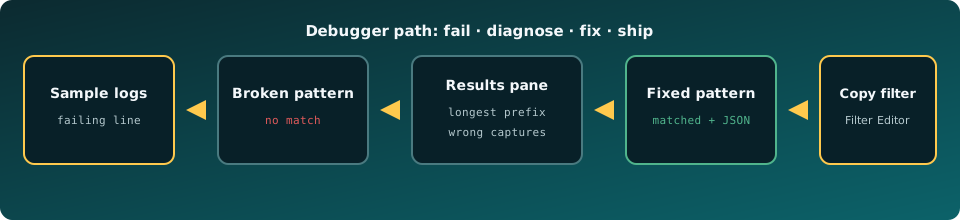
Field-by-field path through Logit’s Grok Debugger
Open the Grok debugger. Work the controls in this order — the labels match the live UI:
- Examples — optional. Load a preset (Apache combined, Nginx access, Syslog, and others) only to learn the layout; replace the sample with your failing line before you trust the result.
- Pattern set — choose ECS v1, Legacy, or Logit.io extras. ECS v1 and Legacy track logstash-patterns-core; Logit.io extras add names such as
NGINXACCESSon top of ECS v1. If the pipeline and the debugger disagree on the set, you will “fix” a match that production cannot expand. - Grok patterns — one pattern per line, tried in order like Logstash
match => […]. - Sample logs — paste the fixture. Each line is tested separately; nothing leaves the browser.
- named_captures_only / keep_empty_captures — mirror the Logstash grok options. With named captures on, a bare
%{IP}does not land in the JSON fields pane even when the engine matched. - Custom patterns —
NAME regexlines inpatterns_dirformat when you need names that are not in the built-in set. - Pattern browser — search and click to insert a token at the cursor instead of typing from memory.
- Press Run. Read Results: matched vs no match, longest prefix on failures, and the JSON object of captures. When green, use Copy filter under “Use this in Logit.io”.
The engine behind Run is Oniguruma in the browser (vscode-oniguruma), not JavaScript RegExp. Inline (?i) and (?<name>…) behave like Logstash. A match that only works in a JS-flavoured tester is not a shippable result.
Worked example: broken pattern → longest prefix → fixed match
Fixture (Nginx-style access line with request time — documentation addresses only):
192.0.2.12 - - [03/Oct/2026:16:21:09 +0000] "GET /api/v1/orders?id=42 HTTP/1.1" 200 21 "-" "kube-probe/1.29" 0.002Broken pattern (the usual shortcut — IP, method, path, status — as if the line were already trimmed):
%{IP:client} %{WORD:method} %{NOTSPACE:path} %{INT:status}On ECS v1, Run returns no match. The Results pane highlights the longest prefix that still matched: the client IP, then the pattern dies on the first - (the ident field). That is the signal. The line is combined-access shaped; your pattern expected the method immediately after the IP.
Fixed pattern — either load the Nginx access example (pattern set Logit.io extras) or write the captures you need explicitly:
%{IPORHOST:clientip} %{USER:ident} %{USER:auth} \[%{HTTPDATE:timestamp}\] "%{WORD:verb} %{NOTSPACE:request} HTTP/%{NUMBER:httpversion}" %{NUMBER:response} (?:%{NUMBER:bytes}|-) %{QS:referrer} %{QS:agent} %{NUMBER:request_time:float}Run again. Results should show matched with JSON fields such as clientip, verb, request, response, and request_time as a float. If you prefer a single named pattern, %{NGINXACCESS} on Logit.io extras covers this shape — still verify against your line; presets are starting points, not guarantees.
Refuse the other shortcut too: wrapping the unknown middle in %{GREEDYDATA:rest} so “everything matches.” That clears _grokparsefailure while leaving Discover useless. Fix the structure until the fields you alert on exist as named captures.
Failure modes the Results pane surfaces
- No match + longest prefix — the pattern consumed a prefix then hit a literal or token it cannot eat. The character offset in Results is the edit point; do not rewrite from column zero.
- Wrong or missing capture names — match is green but the JSON object is empty or oddly keyed. Check
%{PATTERN:field}(and nested%{PATTERN:[http][response][status_code]}). Withnamed_captures_onlyenabled, tokens without:fieldare omitted from stored fields. - Greedy vs possessive traps —
%{DATA}/%{GREEDYDATA}in the middle of a pattern invites backtracking. On this debugger, runaway patterns hit a 1.5 second timeout instead of freezing the tab. Prefer tight tokens (NOTSPACE,WORD,NUMBER) and putGREEDYDATAonly at the end. - Multiline gotchas — Sample logs tests each line alone. A Java stack frame preset can match one
at …line; it will not reassemble a multiline exception. Fix multiline at the input/codec (or a prior mutate) before you blame grok. - Timezone /
@timestampissues — grok extracts a string (HTTPDATE,TIMESTAMP_ISO8601); it does not set OpenSearch/Elasticsearch@timestampby itself. Mixing IIS and Apache date shapes in one pattern produces conflicting timezone strings on the same field. Split patterns or follow grok with a dedicated date filter. Combining ISO-8601 and HTTPDATE in one expression is a common source of “matched but wrong time” incidents. - Oniguruma quirks vs JS testers —
(?i)case folding and Oniguruma named groups are valid here and in Logstash. BrowserRegExpcheatsheets are not a substitute. If a pattern only works in a JS playground, treat that as a failed review. - Pattern-set drift — green on Logit.io extras, red on a pipeline that only loads ECS v1. Align the radio button with production, or add the missing names under Custom patterns /
pattern_definitions.
Unlock complete visibility with hosted ELK, Grafana, and Prometheus-backed Observability
Copy the filter into a Logs pipeline
When Results is green and the JSON fields are the ones your alerts need, scroll to Use this in Logit.io. Copy filter emits a top-level filter { grok { … } } block. Paste it as its own top-level section in the Logit.io Filter Editor — do not nest it inside an existing filter { }. Referenced Logit.io extras become pattern_definitions in that snippet so the hosted pipeline can expand the same names you just tested.
Shipper-first pipelines belong on Logit’s log management product (plans from $25/mo annual). Wire collection with the Logstash integration docs, then confirm structured fields in Discover before you delete the old pattern. If the destination is a dedicated search cluster rather than the Logs stack, land parsed events on Hosted OpenSearch instead.
Share links on the debugger restore editor state from the URL hash; they do not auto-run. Re-press Run after opening a shared fixture so you see today’s engine result, not a remembered screenshot.
Get started
Take one production line that already has _grokparsefailure. Open the Grok debugger, set the pattern set to match your pipeline, paste the line, and Run the pattern you ship today. Read the longest prefix. Fix tokens until Results shows matched fields you can alert on. Copy the filter into the Filter Editor, deploy, and verify in Discover. Keep the encyclopedia tabs closed until the fixture is green.
Parse failures are line-local. The debugger makes that literal.