


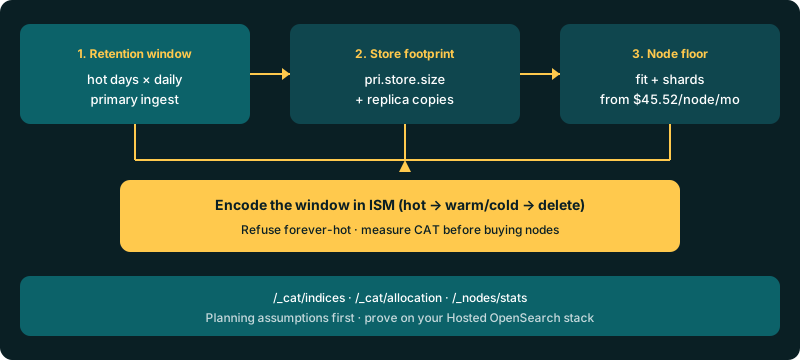
Stretching retention on Hosted OpenSearch is not “just more disk.” Retention days × measured daily primary ingest ≈ the hot/warm store that must fit on data-bearing nodes. Index State Management (ISM) is how you enforce that window — hot → warm/cold → delete — instead of leaving every index forever-hot “to be safe.” That forever-hot habit is the expensive failure mode: replica placement, minimum primary shards, and the hot window often force another node before free disk looks empty.
This post is the planning path operators actually run: measure primary store with CAT APIs, encode day thresholds in an ISM policy, then size nodes against published OpenSearch pricing (developer tiers from $45.52/node/mo annual). Governance vocabulary lives elsewhere — enterprise retention strategies and how long to hang onto data. Here the question is narrower: will this retention policy fit the node floor you are about to buy?
Contents
Retention is a node-count problem, not a policy PDF
A retention PDF that says “90 days” without a primary-byte estimate is not a capacity plan. On Logit.io the cluster is already managed — create flow provisions multiple nodes, upgrades are handled — so the dial you still own is how long indexes stay searchable and how many copies of them allocate. Every extra hot day multiplies yesterday’s primary ingest. Every replica that must place on a different node multiplies that footprint again.
Node shopping before ISM is backwards. Published developer tiers start from $45.52/node/mo annual; that number is useful only after you know the store the policy will hold. Sister posts already cover the adjacent math: ingestion capacity for 50 GB–1 TB/day and shard sizing with CAT APIs. Retention is the third leg — days, not only daily volume or shard shape.
Measure primary store before you pick days
Start from a live stack. If you do not have one yet: create an OpenSearch cluster, then copy the REST host from Stack Settings → Endpoints. Useful calls operators actually run (add ?v for headers):
GET /_cat/indices?v&h=index,health,pri,rep,docs.count,store.size,pri.store.size
GET /_cat/allocation?v
GET /_nodes/stats/indices/store,fs?pretty
pri.store.size is the primary footprint signal. Day-over-day growth on the write index approximates primary ingest. /_cat/allocation shows how much each node already holds — the floor you are about to grow. /_nodes/stats store and filesystem sections confirm whether free disk is real headroom or already spoken for by replicas and merges. Capture a baseline before you lengthen retention: primary store, replica count, allocation per node, and whether health is green or yellow.
Anonymised production patterns and ops signals that show up across stacks are catalogued in anonymised OpenSearch ops facts; use those as pattern recognition, not as your numbers. Your CAT snapshot is the source of truth.
Encode the window in an ISM policy
ISM turns “keep 14 days hot, delete by 90” into states, actions, and transitions the cluster can enforce. Upstream policy shapes are documented in the OpenSearch ISM documentation; on Logit.io treat gists as drafts to verify — plan retention and managed limits may constrain what a self-hosted policy assumes. Ground index lifecycle work in the index management docs and the OpenSearch overview.
Example policy JSON (day thresholds are illustrative — replace with measured windows):
PUT _plugins/_ism/policies/logs-retention
{
  "policy": {
    "description": "Hot 14d, reduce replicas, delete at 90d",
    "default_state": "hot",
    "states": [
      {
        "name": "hot",
        "actions": [],
        "transitions": [{
          "state_name": "warm",
          "conditions": { "min_index_age": "14d" }
        }]
      },
      {
        "name": "warm",
        "actions": [{
          "replica_count": { "number_of_replicas": 0 }
        }],
        "transitions": [{
          "state_name": "delete",
          "conditions": { "min_index_age": "90d" }
        }]
      },
      {
        "name": "delete",
        "actions": [{ "delete": {} }],
        "transitions": []
      }
    ]
  }
}
Attach the policy to matching indexes (or via template/ISM template patterns your stack supports), then prove transitions on a short-lived test index before you trust production deletes. Hot stays searchable with the replica count you need for green; warm sheds copies you no longer pay to place; delete removes the index when the compliance window ends. If ingest settings fight the lifecycle — refresh storms, bulk rejects — fix those with the high-ingestion settings checklist before you add nodes to paper over a missing delete transition.
Unlock complete visibility with hosted ELK, Grafana, and Prometheus-backed Observability
Planning assumptions: days × ingest → store → nodes
The table below is a planning-assumptions worksheet, not a measured benchmark. Assumptions: ~50 GB/day primary ingest (steady), one replica on hot indexes only, warm drops replicas, no invented GB/s or docs/sec. “Illustrative nodes” shows how quickly node-count pressure grows when the hot window stretches — use your CAT pri.store.size growth instead of these rows when you have them.
| Hot days (assumption) | Rough primary store | Hot store with 1 replica (approx.) | Illustrative node pressure @ $45.52/node/mo |
|---|---|---|---|
| 14 | ~700 GB | ~1.4 TB allocated | Fits a small multi-node floor if disk tiers match; verify allocation before stretching days |
| 30 | ~1.5 TB | ~3.0 TB allocated | Often another data node (or larger tier) before free disk looks empty — replicas + min primaries still need homes |
| 90 | ~4.5 TB | ~9.0 TB while forever-hot | Expensive if left hot; ISM warm/delete is how you avoid buying nodes for data you meant to expire |
Multiply your measured daily pri.store.size growth by the hot days you insist on, add replica copies that must allocate, then open OpenSearch pricing. Logs plans start from $25/mo, metrics from $12/mo, APM from $20/mo — keep shipper-first pipelines on log management unless OpenSearch itself is the product.
Failure modes: forever-hot, yellow replicas, delete-too-soon
- Forever-hot “to be safe” — every index stays on the hottest path with full replicas. Store and shard count climb until the next node is mandatory. Explicit refusal: do not keep everything hot forever; encode delete (or cold) transitions you can defend to compliance.
- Yellow from replica math — lengthening retention without checking placement leaves replicas
UNASSIGNED. Primaries serve; cluster health is yellow. Lower hot replicas, add a node that can hold copies, or move warm indexes to zero replicas via ISM — do not “fix” yellow by deleting primaries. - Delete-too-soon — aggressive
min_index_agethat removes indexes still inside an audit or incident window. Prove the policy on a canary index pattern; keep compliance days in the delete transition, not as tribal knowledge. - Node shopping mid-incident — buying capacity while refresh storms or tiny-shard floods are the real cause. Measure CAT and ingest settings first; scale nodes after the policy and shard shape are honest.
Get started
Run /_cat/indices, /_cat/allocation, and a store slice of /_nodes/stats on your Hosted OpenSearch stack. Write down daily primary growth and the hot days you actually need. Encode that window in ISM — hot → warm/cold → delete — and verify transitions on a test index. Only then size nodes against the Hosted OpenSearch overview and published node pricing on OpenSearch pricing (from $45.52/node/mo annual). Create or resize via the create OpenSearch cluster flow when the measured store demands it.
Retention sets the store. ISM enforces it. Nodes come last.