


When a bulk request comes back with Limit of total fields [1000] has been exceeded, the quick fix is to raise the limit. On Hosted OpenSearch, hold off until you know why the mapping filled up, because a producer that invents a new key for every user, header or timestamp will fill a bigger limit too.
Contents
The ceiling is a symptom, not the repair
Every new field name adds to cluster state and heap use, and they never go away on their own. The OpenSearch 3.3 mapping explosion documentation warns about memory consumption and cluster instability. More disk won't remove them.
Check which index the failed item names. The rest of the batch probably went in fine. Keep the rejected events somewhere you can replay them from. A bigger index.mapping.total_fields.limit might get writes flowing again for a while, but grab the mapping first and work out what keeps growing.
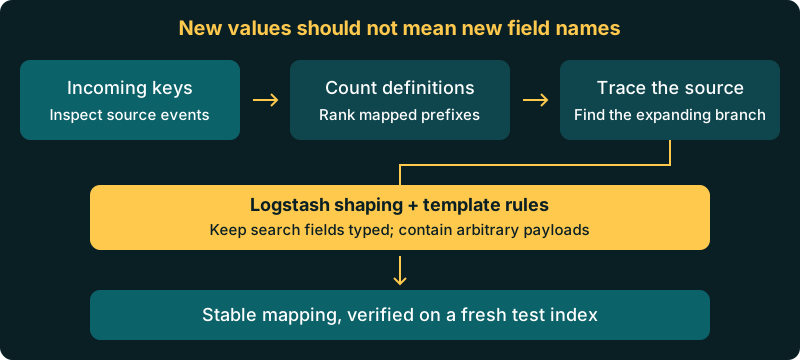
Count definitions in the write index
Use the exact index named in the rejection. A wildcard merges fields across indexes, so it's harder to see which one is full. In Dev Tools, run:
GET /logs-example-000001/_mapping
GET /logs-example-000001/_field_caps?fields=*
The mapping shows every field definition, and field capabilities tells you what's searchable and aggregatable. Counting its keys won't match the limit exactly, because metadata and objects are counted differently. Save the mapping response as mapping.json, then count declared properties and multi-fields per index with jq:
jq 'def mapped: to_entries[] | .value |
  1 + ([((.properties // {}), (.fields // {})) | mapped] | add // 0);
  to_entries[] | {index: .key,
    fields: ([.value.mappings.properties | mapped] | add // 0)}' mapping.json
This includes object containers, aliases and multi-fields declared in that tree. A string mapped as both text and keyword consumes more than one definition. For access mechanics, see the existing mapping inspection walkthrough.
Find the producer minting names
Rank top-level prefixes by their mapped descendants. This jq command uses the same recursive count:
jq 'def mapped: to_entries[] | .value |
  1 + ([((.properties // {}), (.fields // {})) | mapped] | add // 0);
  .[].mappings.properties | to_entries |
  map({prefix: .key, fields: ([{(.key): .value} | mapped] | add)}) |
  sort_by(.fields) | reverse | .[:10]' mapping.json
Start with the biggest branch and look at the events behind it. Labels containing user IDs, headers expanded into arbitrary names and metrics keyed by timestamps can all explain growth. Trace those names to the shipper, parser or application deployment responsible.
Illustrative example: these event shapes store an identifier differently:
{"labels": {"user_8f3a": "1", "user_91bc": "1"}}
{"user_id": "8f3a"}
With dynamic mapping, the first shape adds a property mapping for each new user key. The second reuses user_id because only its value changes.
Compare events from before and after the first rejected write. Look for a parser that recently started decoding an entire message, or an application that turned a collection of attributes into property names. Rotating to a new index only restarts the countdown if the same keys keep arriving.
Keep the failing event and use it as a test case whenever you change the parser. Agree with the producer owner which fields need searching, which payload must be retained and which noise can go. Check alerts and dashboards first so you do not drop a field someone still relies on.
Stop expansion in Logstash
The prune filter accepts whitelist_names and blacklist_names regular expressions. The catch is that prune only works on top-level fields, so it can't pick out children inside an object you keep.
filter {
  prune {
    whitelist_names => ["^@timestamp$", "^message$", "^service$", "^tags$", "^payload$"]
  }
  mutate { remove_field => ["[payload][debug_dump]"] }
}
The whitelist already drops anything not listed, including debug_ fields, so you don't need a blacklist_names rule as well. The alternative is blacklist_names => ["^debug_"] on its own. Either way, add your routing and enrichment fields to the whitelist before using it. Known nested paths can instead use mutate { remove_field }; the existing Logstash field removal examples cover conditional removal.
To keep free-form JSON under a namespace, use the JSON filter's target option:
filter {
  json { source => "message" target => "payload" }
}
A namespace alone does not bound the schema, because an ordinary dynamically mapped object still creates child mappings. It needs a deliberate object mapping as well. Check that every writer actually goes through Logstash; on a standalone Hosted OpenSearch cluster that isn't guaranteed.
Make the template enforce the contract
Who can change the template depends on your setup. On a managed Logit.io stack, mappings and index templates are read-only: you can read them, but not change them (see the managed stack limitations). The Logit.io Index and Template APIs guide shows how to read the current template. On a managed stack, the fix belongs upstream in Logstash, and template changes go through support. If you create your own custom indexes, you can apply the rules below yourself. Template changes only affect new indexes.
In the 3.3 dynamic parameter documentation, true is the default and adds fields; false retains unknown fields in _source without indexing them; strict rejects documents introducing unknown fields. There are two newer modes as well: strict_allow_templates (added in OpenSearch 2.16) rejects new fields that don't match a dynamic template, and false_allow_templates (added in 3.3) maps matches and leaves the rest unsearchable. Check your stack's version before relying on either.
Managed stacks let you create your own indexes with mappings, even though the stack templates are read-only. This example creates an index that keeps an opaque payload and maps the timestamp explicitly:
PUT /my-custom-index-000001
{
  "mappings": {
    "dynamic": false,
    "properties": {
      "@timestamp": {"type": "date"},
      "payload": {"type": "object", "enabled": false}
    }
  }
}
For controlled expansion, dynamic templates can map unknown strings directly to keyword with an illustrative ignore_above: 256. That skips the extra text multi-field, but each new key still gets added. Alternatively, match an object path and map it with enabled: false, which skips parsing but retains the source. Matching controls how fields are mapped, not how many there are.
For arbitrary objects needing occasional lookup, OpenSearch uses flat_object, not Elasticsearch's flattened. The 3.3 flat object documentation dates its introduction to 2.7. It supports exact matches and dot-path access without indexing every subfield for fast lookup. Searches can require expensive scans. Filtering by subfields, subfield aggregations, numeric comparison and numeric sorting, text analysis and highlighting aren't supported. Keep fields your dashboards need as separately typed fields, and test your real queries before picking it.
Before rolling out, index a test event with one expected field, one unknown key and the payload. Fetch it back to check nothing was lost, look at the mapping to check no payload children appeared, and run the dashboard queries that matter. With strict mode, also send a document that should be rejected and check your pipeline records and replays it. With dynamic: false, a document being accepted doesn't mean you can search every field in it.
A bounded schema can justify more room
A reviewed, large ECS-style template can legitimately need a higher ceiling. Count its fields and test against that number. On a managed stack, ask support to raise the limit in the stack's template so new indexes pick it up. For your own indexes, set the limit on each index you create, or ask support to add it to the stack template.
The OpenSearch mapping explosion page also suggests looking at indices.query.bool.max_clause_count when you raise the field limit, so larger queries still fit. It's a cluster-level setting, and on a managed stack some cluster settings are platform-managed, so contact support if you think you need it changed.
These are upstream OpenSearch 3.3 defaults from the mapping explosion page, not a promise about your stack's overrides:
| Setting | Default | Scope |
|---|---|---|
| index.mapping.total_fields.limit | 1000 | Fields, objects and aliases per index |
| index.mapping.depth.limit | 20 | Mapping depth |
| index.mapping.nested_fields.limit | 50 | Distinct nested mappings per index |
| index.mapping.nested_objects.limit | 10000 | Nested objects per document |
| index.mapping.field_name_length.limit | 50000 | Field-name length |
Each limit guards something different, so raising the total-field limit won't fix a mapping that's too deep. Removing fields upstream won't shrink an existing mapping either; the old fields only go when data moves to a fresh index, so plan any reindex carefully and check reads before switching aliases.
Migration needs a field contract
If you're coming from Datadog facets or Splunk search-time extraction, you might be used to deciding structure later. OpenSearch fixes field types when data is written. Carry that distinction into your Datadog migration or Splunk migration: promote fields used for searches and aggregations, contain the rest, and test replay before cutover.
The Hosted OpenSearch overview covers the service itself. Adding nodes won't fix mapping growth, because the problem is each index's mapping; sort out your fields before using OpenSearch pricing for capacity planning. Take the mapping, the biggest prefix and one sample event to the team that owns the producer.
Unlock complete visibility with hosted ELK, Grafana, and Prometheus-backed Observability