
Hosted OpenSearch MCP for Cursor & Claude
Query your Logit.io OpenSearch data from AI tools with a managed, read-only MCP endpoint — no local servers to run or maintain.
Trusted by engineering teams worldwide


















































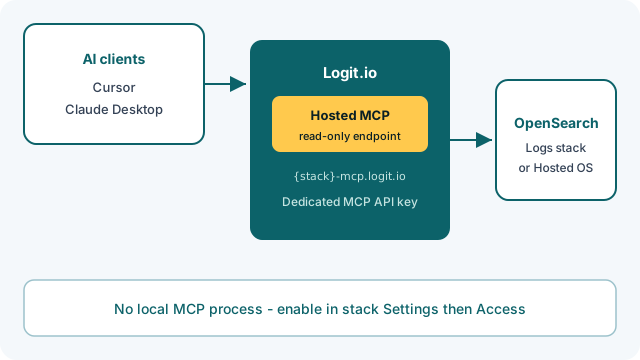
Logit.io hosts a read-only OpenSearch MCP server for your Logs and Hosted OpenSearch stacks. Connect AI clients such as Cursor or Claude Desktop without running MCP locally — we provision {stack-id}-mcp.logit.io and a dedicated MCP API key from the dashboard.
Available on Hosted OpenSearch, Log Management, and Custom plans. See the full setup guide in our Hosted OpenSearch MCP docs.
Open the same data in Hosted OpenSearch and OpenSearch Dashboards.
What is Hosted OpenSearch MCP?
Model Context Protocol (MCP) lets AI assistants call tools and data sources safely. Logit.io runs an OpenSearch MCP server for each enabled stack so your AI client can search and explore log data through a managed HTTPS endpoint.
You get a hosted MCP URL, copy-paste config for Cursor and Claude Desktop, and independent key rotation on the stack's Endpoints page — without deploying containers or maintaining a local MCP process.
Enable in minutes
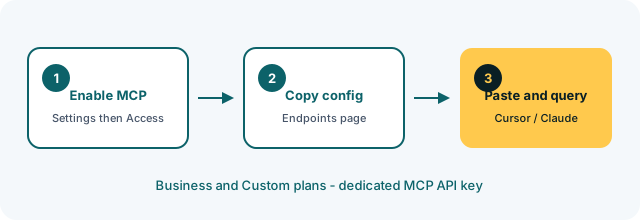
Open your stack Settings, find OpenSearch MCP under Access, and select Enable. Logit.io provisions the MCP endpoint and generates a dedicated API key (separate from your OpenSearch -es HTTP key).
Copy the example config from Endpoints, paste it into Cursor MCP settings or Claude Desktop, and start asking questions about your data. Full steps: Hosted OpenSearch MCP documentation.
Read-only by design
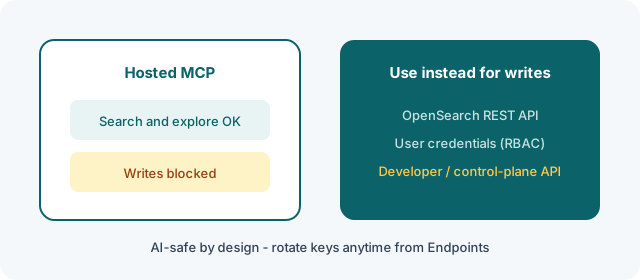
Hosted MCP is intentionally read-only — ideal for AI-assisted investigation without write risk. For programmatic writes or stack-key automation, use the OpenSearch REST API. For role-scoped human or CI access, use OpenSearch API user credentials (RBAC).
For control-plane automation (stacks, pipelines, alerts), see our Developer API.
Part of managed OpenSearch
MCP sits alongside the rest of Logit.io’s hosted OpenSearch platform — Dashboards, search, reporting and RBAC. Alerting runs on managed alerting. Start with a 14-day free trial, then enable MCP on Hosted OpenSearch, Log Management, or Custom when you are ready to bring an AI client into the workflow.
See it in practice: Investigating production logs with Hosted OpenSearch MCP walks through a post-deploy error spike from Cursor or Claude Desktop.
Key benefits
Managed endpoint per stack — enable in the dashboard and connect Cursor or Claude Desktop.
Dedicated MCP API key with rotation; keep write and control-plane access on other APIs.
Copy-paste config for Cursor and Claude Desktop against your live OpenSearch data.
Enable MCP on Hosted OpenSearch, Log Management, and Custom plans for AI-assisted investigation of your OpenSearch data.
Companies feel the difference when they use Logit.io
“One thing is certain when operating in the startup space, a strict budget. Before we make any purchase decision to use a SaaS Log Management platform, we need to validate the benefits of the platform and more importantly the team behind the platform.”
“Logit.io's customer support team stood out. Right from the beginning, the Logit.io team was there to answer questions and walk us through the process.”
Start your 14-day free trial
No credit card required. Log plans from $25/mo billed annually and dedicated clusters from $45.52/node/mo.