Connect directly to your OpenSearch cluster
Call the full OpenSearch REST API on your stack to search and index documents, manage indexes and templates, check cluster health, run reindex jobs, and anything else in the OpenSearch API reference (opens in a new tab).
Logit.io supports two authentication modes on the stack endpoint: API key (default) and Basic (username and password).
When signed in, examples auto-fill @opensearch.endpointAddress, @opensearch.apiKey, @opensearch.username, and @opensearch.password from Settings → Endpoints (Logs and OpenSearch stacks).
Choose your access method
| Method | Hostname | Credentials | Guide |
|---|---|---|---|
| Stack API key | {stack-id}-es.logit.io | Stack API key / Basic (stack ID + stack key) | This page |
| User credentials | {stack-id}-es-user.logit.io | Different Profile or service-account username/password (not the stack key) | OpenSearch API (user credentials) |
| Hosted MCP | {stack-id}-mcp.logit.io | Different dedicated MCP username + MCP API key | Hosted MCP quickstart |
User credentials require a Business or Custom plan. Hosted MCP is available on Log Management and Custom plans. Enable each applicable method independently under Settings → Access.
Which stack type do you have?
| Logs stack | OpenSearch stack | |
|---|---|---|
| Product | Log management (Logstash + OpenSearch + Dashboards) | Dedicated OpenSearch cluster |
| Dashboard path | Stack → Settings → Endpoints | Stack → Settings → Endpoints |
| Also on stack summary | OpenSearch section → View Full Details | Stack summary (show password) |
| Product-specific docs | Log Management overview | OpenSearch product overview |
How to find your connection details
- Sign in to your Logit.io account.
- Open Settings for the stack you want to access.
- Select Endpoints from the menu.
- In OpenSearch API Details, copy your endpoint, credentials, and preferred port.
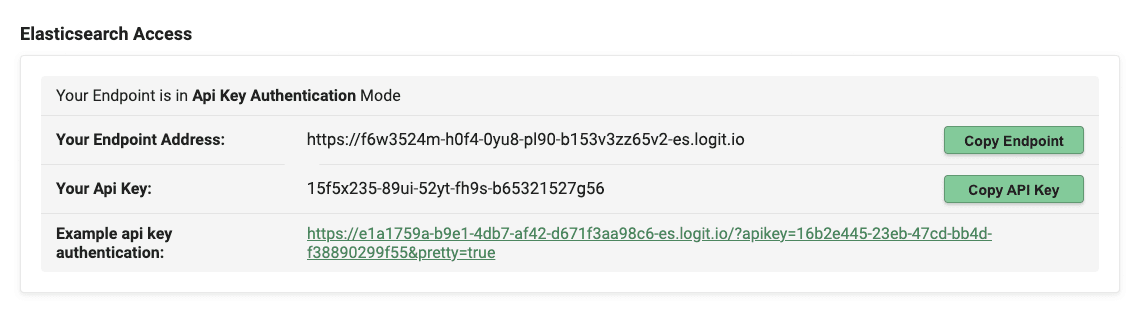
The Endpoints page shows:
| Field | Description |
|---|---|
| Authentication Mode | API Key or Basic (Username and Password). Stack administrators can switch modes from this page. |
| Endpoint | https://{stack-id}-es.logit.io |
| API Key | Shown in API key mode. Append as the apikey query parameter on requests. |
| Username / Password | Shown in Basic mode. Username is your stack ID; password is your stack API key. |
| Available Ports | 9200 (SSL default port) or 443 (SSL TCP port). Both use HTTPS. |
The page also provides Example Authenticated API Access URLs with your credentials embedded.
Base URL and ports
@opensearch.endpointAddressAppend the OpenSearch API path (for example /_cluster/health, /_search, or /my-index/_doc) to that URL.
Ports: 443 (common for HTTPS clients) or 9200 (OpenSearch default SSL port).
Using any OpenSearch API endpoint
| Operation | HTTP method | Path |
|---|---|---|
| Cluster health | GET | /_cluster/health |
| List indexes | GET | /_cat/indices?v |
| Search | GET or POST | /_search or /{index}/_search |
| Index a document | POST | /{index}/_doc |
| Bulk ingest | POST | /_bulk |
| Get index templates | GET | /_index_template or /_template |
| Reindex | POST | /_reindex |
See API Overview for Logit guides by API family.
Using API key authentication mode
Pass your stack API key as the apikey query parameter on every request.
curl -X GET "@opensearch.endpointAddress:443/_cluster/health?apikey=@opensearch.apiKey&pretty"Using Basic (username and password) authentication mode
Username = stack ID, password = stack API key. Example authenticated URL from the Endpoints page:
https://@opensearch.username:@opensearch.password@@opensearch_id-es.logit.io:443curl -X GET "@opensearch.endpointAddress:443/_cluster/health?pretty" \
-u "@opensearch.username:@opensearch.password"Switching authentication mode
Switch between API Key and Basic on the Endpoints page (~30 seconds to apply). Use Basic for clients that expect user and password (for example Logstash elasticsearch output or Serilog).
Next steps
- OpenSearch API (user credentials) — role-scoped Basic auth on
-es-user - Hosted MCP quickstart — Cursor / Claude
- API Overview
- Examples — connect, query, export to CSV, and more
- Search APIs
- Managed Stack Limitations