


An es_rejected_execution_exception in a Logstash log, or a burst of HTTP 429s from a bulk request, reads like an outage. Usually it isn't one. OpenSearch is telling the sender that a node's write queue is full and the batch should come back later.
The useful question is where that pressure goes next. If it travels back through Logstash to a disk queue, and from there to Filebeat, nothing is lost and the lag drains once the spike passes. If something in the chain retries blindly, drops on overflow or hides per-item failures, a temporary slowdown becomes a gap in your logs.
Contents
A 429 means slow down, not start again
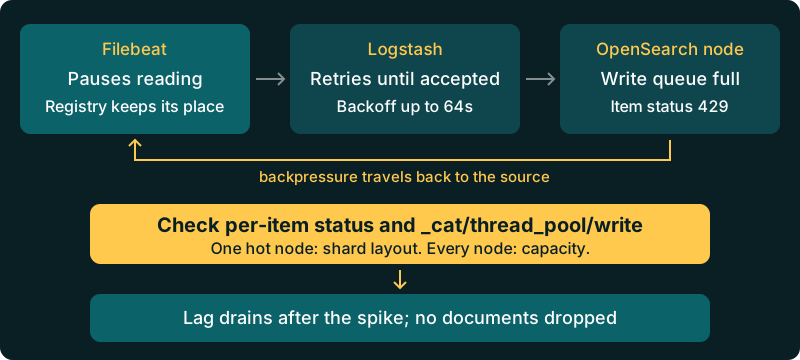
Each OpenSearch node runs a fixed write thread pool with a bounded queue. Bulk shard requests wait in that queue while the threads are busy. When the queue is full, the node rejects new work with es_rejected_execution_exception, and the bulk API reports it as status 429 (Too Many Requests).
That rejection is deliberate. The alternative is a node that buffers everything in heap until it falls over. A 429 is the cluster protecting itself, and the right client response is to wait and resend the same documents, not to open more connections or start a second copy of the pipeline.
The figure shows the path a healthy rejection should take: back from the node, through Logstash, and back to the shipper, which simply stops reading its files for a while.
Read the bulk response one item at a time
A bulk request can return HTTP 200 while some of its items failed. The top-level response carries "errors": true, and each item has its own status. A shortened example of one rejected item looks like this:
{
  "took": 31,
  "errors": true,
  "items": [
    { "index": { "_index": "logs-2026.10.27", "status": 201 } },
    { "index": {
        "_index": "logs-2026.10.27",
        "status": 429,
        "error": {
          "type": "es_rejected_execution_exception",
          "reason": "rejected execution of coordinating operation ..."
        }
    } }
  ]
}
Any custom script or Lambda that posts to _bulk and only checks the HTTP code will report success here and silently lose the second document. Logstash and Beats both inspect items, which is one reason to keep them in the path rather than a hand-rolled sender.
Separate the 429s from the 400s while you read. A 400 such as mapper_parsing_exception will never succeed on retry, so the Logstash OpenSearch output sends it to the dead letter queue when that is enabled. On a Logit stack you can turn this on under Advanced Stack Settings and inspect rejected events in a dlq-* index, as described in the Logstash dead letter queue guide. A 429 is different: the output retries 429s (and 503s) indefinitely, so they don't go to the DLQ. If the DLQ is filling up during a spike, look for a mapping problem riding along with the load.
Find which node is rejecting
Rejections are counted per node, so start with the thread pool rather than cluster health, which can stay green throughout:
GET _cat/thread_pool/write?v&h=node_name,active,queue,rejected,completedThe rejected column is cumulative since the node started, so take two readings a minute apart and compare. If one node is rising and the rest are flat, the load is not evenly spread. The usual cause in log clusters is a daily write index with one primary shard: every document for that day lands on a single node, and that node's queue fills first. Check where today's shards sit:
GET _cat/shards/logs-2026.10.27?v&h=index,shard,prirep,node,docs,storeIf every node is rejecting at a similar rate, the cluster is short of indexing capacity overall, and that is a sizing conversation rather than a tuning one.
Give backpressure a disk to land on
When the OpenSearch output gets a 429, Logstash keeps retrying the rejected items with exponential backoff. While it does, the pipeline stops taking new batches, and the input stops reading. With the default in-memory queue, that pressure reaches the Beats input almost immediately, and a Logstash restart in the middle of a spike throws away whatever was in flight.
If you run your own Logstash in front of your Logit stack, a persistent queue gives that pressure somewhere durable to sit. In a self-managed Logstash 8.x node, set it in logstash.yml or per pipeline:
queue.type: persisted
queue.max_bytes: 8gb
pipeline.batch.size: 250
pipeline.batch.delay: 50
Size queue.max_bytes from your peak ingest rate and the longest slowdown you want to absorb. For example, ten minutes of backlog at 5 MB per second is roughly 3 GB on disk. Raising pipeline.batch.size builds larger bulk requests, which costs OpenSearch less per document than many small ones, but it also raises Logstash heap use, so change it in steps and watch both sides.
The OpenSearch output settings for retries (retry_initial_interval, default 2 seconds, and retry_max_interval, default 64 seconds) rarely need changing. Shortening them just sends the same rejected batch back sooner, to the same full queue.
Size Filebeat batches for the pipeline you have
Filebeat handles backpressure well by default. When Logstash stops acknowledging batches, Filebeat stops reading files and keeps its place in the registry, so it picks up where it left off. The risks are elsewhere: log rotation deleting a file Filebeat has not finished, and settings copied from a benchmark that fire far more requests than the pipeline can take.
A reasonable starting point for Filebeat 8.13 and later sending to a Logit stack's Logstash endpoint:
queue.mem:
  events: 3200
  flush.min_events: 1600
  flush.timeout: 5s

output.logstash:
  hosts: ["your-stack-endpoint:your-beats-ssl-port"]
  loadbalance: true
  ssl.enabled: true
  bulk_max_size: 2048
  backoff.init: 1s
  backoff.max: 60s
Take the real host and port from your stack settings, following the Filebeat integration guide. If you also run Logstash yourself before sending on, the Logstash integration guide covers the output side.
Keep rotation in mind during long slowdowns. If files rotate out faster than Filebeat can drain them, set close_removed and clean_removed deliberately and keep a few more rotated files on the host. Backpressure only protects data that still exists on disk.
When rejections are a capacity signal
Short bursts of 429s that clear within minutes are the system working as designed. Sustained rejections across every node, with the Logstash queue growing all day, mean the cluster cannot keep up with your normal ingest rate. Tuning will not fix that.
On managed Logit stacks, cluster-level settings such as thread pools are managed by Logit.io, and some cluster settings changes may be rejected. If a hot single-shard index or a too-frequent refresh is the cause, contact support with your _cat/thread_pool and _cat/shards output. Raising thread_pool.write.queue_size is rarely the answer anyway: a deeper queue only holds more requests in heap before the same rejection arrives.
Going over your daily volume won't cause rejections on its own. Logit accounts include over-usage protection for log volume, so data keeps flowing when you exceed your daily allowance. Node count is a separate question. The OpenSearch pricing page lists the per-node cost if you need more indexing headroom, and the reindexing guide helps if you later consolidate small indices created during the incident.
This post covers the write path under load. For other ingestion problems, see the earlier posts on field type conflicts and mapping explosion.
Migrating a pipeline that already drops on overflow
Teams moving from a self-managed Elasticsearch or OpenSearch cluster often bring a pipeline that has been quietly dropping data under load for years. Common causes are a custom bulk sender that ignores item status, a Fluentd or Vector buffer set to drop when full, or a Logstash node with a memory queue that restarts during deploys.
Before you cut over, replay a busy hour of real traffic and count documents at both ends. If the totals differ, find out where the overflow went before you blame the new destination. The Hosted OpenSearch overview covers what is managed for you. What stays with you is the shipper configuration: a disk queue, retries that back off and a Filebeat registry that can wait.
Unlock complete visibility with hosted ELK, Grafana, and Prometheus-backed Observability