


Procurement teams asking for UK-hosted OpenSearch usually mean something concrete: indexes and cluster storage should land in a UK data centre, not wherever a vendor’s default region happens to be. On Logit.io that choice is an account-level data storage region, not a free toggle on every stack. Get the first stack right and every later OpenSearch or log stack in that account follows. Get it wrong after go-live and you are looking at a second account, not a silent migrate button.
This walkthrough sticks to the live product docs: first-stack region lock, Stack Settings → Overview checks, the 14-day trial delete/recreate path, and when UK plus EU or US needs a second account. Pair it with the Hosted OpenSearch overview and OpenSearch pricing when you size a cluster.
Contents
- Why UK residency shows up in OpenSearch buying conversations
- Account-level region lock (first stack sets the default)
- Check the region on Stack Settings → Overview
- Changing region during a 14-day trial
- Second region = second account (when UK + EU/US both needed)
- Hosted OpenSearch + UK region + per-node pricing
- Failure modes / common mix-ups
- Get started
Why UK residency shows up in OpenSearch buying conversations
UK buyers rarely ask for “multi-cloud vibes.” They ask where the data sits. Public sector contracts, financial services retention rules, and customer DPAs often name the United Kingdom as an allowed processing location. Logit.io’s docs treat that as a storage-region decision across Europe, the US, and UK regions when you add a stack — you pick a dedicated data centre for the account’s stacks so processing lines up with regional guidelines you already have on paper.
Your own office location does not force the region. The data storage regions guide is explicit: you can host an account’s data in any of the published regions regardless of where you or your systems sit. That matters for UK residency specifically — a US-based engineering team can still stand up UK Hosted OpenSearch for a UK customer workload, as long as the account’s default region is set to UK before production data lands.
Compliance posture on the platform side is documented separately on security and compliance (including ISO 27001 and GDPR-aligned practices). Residency is still the account region setting; certifications do not replace picking UK on first stack create.
Account-level region lock (first stack sets the default)
Region is not a per-stack preference you redefine every Monday. It is an account-level setting. When you create the first stack on an account — trial or paying — the region you select becomes the default for that account. Every subsequent stack added to the same account deploys to that default. The create flow for additional stacks does not offer another region picker; the UI simply places them where the account already lives.
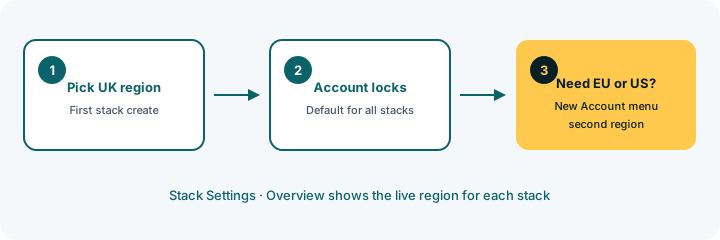
For Hosted OpenSearch that means the dedicated cluster you provision inherits the account region like any other stack type. There is no separate “OpenSearch-only region” switch. If the account default is UK, new OpenSearch stacks go to UK. If someone spun up the first log stack in EU during a hasty trial, your later OpenSearch cluster follows EU until you use a different account.
Need stacks in an additional region? The docs recommend creating a new account from the left-hand dashboard menu (New Account), then choosing the other region on that account’s first stack. Two regions, two accounts — billing and access follow accordingly.
Check the region on Stack Settings → Overview
Before you wire shippers or hand a region claim to security review, verify what the platform shows today.
- Account profile: Account Settings in the left-hand menu → overview / account profile shows the region selected for the account.
- Per-stack check: open the stack → Stack Settings → Overview. The overview lists which region that stack is deployed to.
Use Stack Settings → Overview when you manage several stacks and need confirmation on the OpenSearch cluster itself. If Overview and Account Settings both say UK, you are aligned. If they disagree with procurement’s assumption, stop ingestion planning until the account story matches the contract.
Changing region during a 14-day trial
Trials are the only documented path to change the default without standing up a second account for production. On a trial account, the first-stack create screen includes the storage region selector. If you picked the wrong region, the documented fix inside the 14-day trial window is: delete the current stack, then add a new first stack and choose the correct default region.
That delete/recreate step resets the account’s default because you are effectively redoing first-stack setup. It also deletes the trial stack’s data — fine for empty experiments, painful if you already bulk-loaded indexes. Treat region selection as a day-one checklist item on the trial, before you invest in Logstash pipelines or OpenSearch index templates.
Paying accounts follow the same first-stack lock when the account is first set up. After that, additional stacks inherit the default with no region picker. Do not plan a production cutover that assumes you can flip UK ↔ EU on a live paying account from Stack Settings.
Unlock complete visibility with hosted ELK, Grafana, and Prometheus-backed Observability
Second region = second account (when UK + EU/US both needed)
Some programmes need UK residency for customer PII search indexes and a separate EU or US cluster for global ops telemetry. Logit.io’s model for that is multiple accounts, not multi-region stacks under one login tree.
Practical pattern:
- Create the UK account first. On first stack create, select the UK storage region. Provision Hosted OpenSearch (or a log stack) there.
- From the dashboard, choose New Account for the second geography.
- On that account’s first stack, select EU or US as required. Deploy the second OpenSearch (or logs/metrics) stack there.
Keep credentials, API keys, and shipper configs scoped per account so UK data never “accidentally” targets the EU endpoint. Reviewers care about that separation as much as the region label on Overview.
Hosted OpenSearch + UK region + per-node pricing
Hosted OpenSearch is the dedicated-cluster product: managed OpenSearch with Dashboards, API access, and node-based sizing. UK is one of the multi-region options already listed on the OpenSearch pricing page alongside US and EU — there is no extra invented geography beyond those published claims.
Pricing for dedicated OpenSearch starts at $45.52/node/mo on the published developer tiers (annual / developer node rates as shown on the OpenSearch pricing page). Cluster cost scales with node count × per-node rate. Separately, log management plans start from $25/mo, metrics from $12/mo, and APM from $20/mo on the public annual plan tables — useful context when the same programme mixes UK Hosted OpenSearch with UK log or metrics stacks under one region-locked account.
Region choice does not change the from-$ amount. You pay the published node tier for the size you pick; residency is which account hosts those nodes.
Failure modes / common mix-ups
- Wrong region after go-live. First stack was EU; security review later requires UK. You cannot flip the live account’s default from Stack Settings. Plan a UK account, migrate indexes and pipelines, and retire the old account when ready — or stay on trial long enough to delete/recreate before production.
- Assuming per-stack region switches. Extra stacks never show a region picker; they inherit. Creating “just one more” OpenSearch stack will not give you UK if the account default is US.
- Checking only Account Settings. Always confirm Stack Settings → Overview on the OpenSearch stack you will point shippers at.
- Mixing endpoints across accounts. Dual-region programmes need separate endpoints and keys. Sharing one Filebeat output across UK and EU accounts breaks the residency story even if both accounts are configured correctly in isolation.
- Confusing platform certifications with residency. ISO 27001 and related controls on the security page support trust; they do not auto-place your indexes in the UK. The region selector does.
Get started
Start a 14-day trial, create the first stack with the UK storage region selected, then open Stack Settings → Overview and confirm UK before you ingest anything important. Read the full control path in the data storage regions docs. When you are ready to size a dedicated cluster, use the Hosted OpenSearch overview and the node table on OpenSearch pricing ($45.52/node/mo from the published developer tiers). If you already know you need UK plus another region, open a second account on day one instead of hoping for a later in-place switch.