


Shard count is not a personality trait for an index. On Hosted OpenSearch it is a measured size problem: how large are the primary shards today, how many of them exist, and can replicas actually allocate on the nodes Logit.io already provisioned. The commodity explainer What are OpenSearch Shards? covers the vocabulary. This post is the production path — CAT measurements, a ~10GB growth decision, and the failure modes that show up when someone pastes a self-hosted “aim for 50–100GB” rule into a two-node hosted stack.
No invented TB/day charts. No customer quotes. You measure your indexes, then change templates so the next index is born correctly. Reindex only when you must reshape data that already exists.
Contents
Measure primary size with CAT APIs
Start from a live stack, not a blog spreadsheet. If you do not have one yet: create an OpenSearch cluster, then copy the REST host and credentials from Stack Settings → Endpoints (same values as connect to your cluster). All sizing checks go through the stack REST host documented in the OpenSearch REST API guide.
Useful CAT calls (add ?v for headers):
GET /_cat/indices?v&h=index,health,pri,rep,docs.count,store.size,pri.store.size
GET /_cat/shards/{index}?v
GET /_cluster/health?pretty
pri.store.size is the signal for primary footprint. Divide by pri when you need an approximate per-primary size on a multi-shard index. /_cat/shards shows which node holds each primary and replica — that allocation view matters when yellow appears after a replica bump. Cluster and CAT behaviour is documented under the Cluster & CAT APIs.
Capture a baseline for every hot write index before you change templates: primary count, replica count, pri.store.size, and whether health is green or yellow. Dev Tools in OpenSearch Dashboards works if you prefer not to curl; the endpoints and credentials are the same ones under Stack Settings. Repeat the CAT snapshot after any template or replica change so you can tell whether the cluster actually absorbed the new math.
From ~10GB toward larger — and when to stop
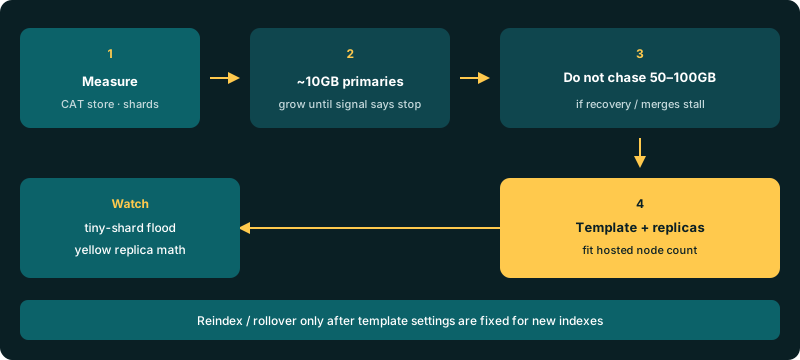
A common working band for logging-style indexes is to keep primary shards from staying tiny forever. Many teams treat roughly 10GB per primary as a floor to grow past: below that, you often have too many shards for the data you hold, which burns cluster state and heap on overhead instead of documents.
Growing past 10GB is fine when merges stay healthy, recovery time after a node bounce is acceptable, and search latency on that index does not spike when a shard relocates. Blindly chasing 50–100GB primaries is not free. Mega-shards lengthen recovery, widen the blast radius of a bad segment merge, and make a single slow disk the bottleneck for an entire index slice. Stop increasing target size when:
- Relocation or recovery for one shard dominates incident time.
- Force-merges or heavy merges peg I/O while ingest is still running.
- You cannot finish a rolling restart window because one primary takes too long to assign.
There is no universal “correct GB.” There is a measured size that still recovers cleanly on your node tier. Prefer fewer, healthier primaries over a slogan number from a self-hosted slide deck. If you are still choosing shard count before the first write, start conservative (often one primary on small hosted tiers), watch how fast pri.store.size climbs over a retention window, then raise shard count only when a single primary would clearly outgrow a recovery window you can tolerate.
Replica math on Logit’s multi-node footprint
Logit.io’s create flow provisions at least two cluster nodes and spreads them for stability. Primaries need a home; each replica copy needs a different data-bearing node. Ask for more replicas than you can place and the cluster goes yellow: primaries green enough to serve, replicas unassigned. That is settings math, not a mysterious platform outage — the same distinction called out in the high-ingestion companion production OpenSearch ingest settings.
Logit’s create-index examples set shards and replicas explicitly:
PUT my-custom-logs
{
  "settings": {
    "number_of_shards": 1,
    "number_of_replicas": 0
  }
}
On a two-node developer footprint, number_of_replicas: 1 is usually the ceiling that still allocates. Zero replicas is acceptable for disposable backfills; production search indexes almost always want at least one. Confirm with GET /_cat/shards/{index}?v after every change. Hosted stacks may adjust defaults — if create fails, contact support rather than inventing a self-hosted reroute.
Unlock complete visibility with hosted ELK, Grafana, and Prometheus-backed Observability
Templates, rollover, and reindex when resizing
number_of_shards is fixed at index create time. You do not “resize” a live primary count with a casual settings update. The production pattern:
- Encode the new
number_of_shards,number_of_replicas, and related write settings in an index template (/_index_templateor legacy/_template) so every matching index inherits them. See Logit’s index templates docs and the Index & Template APIs. - For time-based data, rollover (or create the next write index) so new data lands on the corrected shape. Old indexes keep their old shard count until you delete or reindex them.
- Reindex only when you must reshape historical data — it costs cluster CPU, disk, and time. Prefer template-forward fixes for append-only logs.
ISM and retention on hosted stacks are plan-aware; do not assume every upstream ISM gist applies unchanged. Snapshots and some persistent cluster settings stay platform-managed. Size the write index you control; use plan retention for lifecycle. After you publish a template, create a throwaway matching index (or wait for the next rollover) and re-run /_cat/indices to prove the new pri / rep values stuck — templates never rewrite indexes that already exist.
Failure modes: tiny shards, mega-shards, yellow
- Too many tiny shards — dozens of sub-GB primaries across daily indexes. Cluster state bloats, heap pressure rises, and every refresh/merge multiplies work. Raise per-primary size (fewer shards per index, or longer rollover intervals) until
pri.store.size / priis out of the toy range. - Mega-shards that stall recovery — one primary so large that relocation or restart recovery eats the maintenance window. Split future indexes (more primaries or earlier rollover) before you celebrate a 100GB badge.
- Yellow from bad replica count —
/_cluster/healthyellow plusUNASSIGNEDreplicas on/_cat/shards. Lowernumber_of_replicasor add capacity that can actually hold copies. Do not “fix” yellow by deleting primaries. - Ingest backpressure misread as shard policy — rejected bulk and refresh storms are often
refresh_interval/ bulk size problems. Tune those with the ingest settings guide before you rewrite shard counts mid-incident.
Windows pipelines that feed these indexes — Winlogbeat paths in five ways Windows Event Logs reach OpenSearch, or a controlled Winlogbeat 8 → 9 canary — do not change the shard math. They change how fast data arrives. Size shards from CAT, not from shipper version.
Get started
Open Endpoints on your Hosted OpenSearch stack, run /_cat/indices and /_cat/shards, and write down pri.store.size per write index. If primaries are stuck tiny, plan fewer shards or slower rollover in the template. If recovery already hurts, stop chasing larger targets. Keep replica count inside what your node count can place. Ground the stack itself in the OpenSearch overview, the Hosted OpenSearch overview, and published node pricing on OpenSearch pricing (developer tiers from $45.52/node/mo annual). Logs plans start from $25/mo; metrics from $12/mo; APM from $20/mo — shipper-first pipelines stay on log management unless OpenSearch itself is the product.
Measure. Template forward. Reindex last.