

Hosts that already send Application, System, and Security to Logit.io do not need another first-install walkthrough. They need a controlled Winlogbeat 8 → 9 upgrade that keeps the Logstash SSL contract from Install Integration while Elastic moves Windows state off C:\ProgramData\winlogbeat. This post is that canary plan — not the five-shipper map in Five ways Windows Event Logs reach OpenSearch, and not the greenfield path in First Windows Event Logs with Winlogbeat.
The binary changes. The Logit host, SSL port, fields.type: wineventlog, and routing pipeline string should not. Treat Discover proofs (agent.version, winlog.channel, event.code, host.name) as the pass/fail signal before you roll the rest of the fleet.
Contents
Why 8→9 bites Logit fleets
On Logit.io the shipper still terminates at managed Logstash over TLS. That part of the story is stable: copy hosts and SSL from Install Integration, keep ssl.enabled: true, keep pipeline: "winlogbeat-%{[agent.version]}-routing". What bites fleets is the local Windows contract Elastic changed around service data paths and the registry file Winlogbeat uses to resume channel bookmarks after a restart.
Operators who only swap the ZIP under C:\Program Files\winlogbeat and restart the service can land a “Running” service that reads from a fresh registry while the old bookmark file sits elsewhere — or they force the legacy path and fight permissions for the next patch cycle. The Logstash endpoints look fine in winlogbeat.yml; Discover goes quiet or double-fires. That is a path/registry problem, not a reason to reinvent the Logit output block.
What changes between Winlogbeat 8 and 9
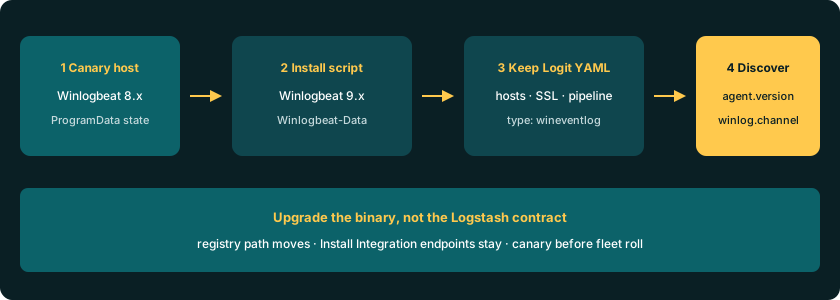
Elastic’s Beats breaking notes and the Winlogbeat installation script document the move: Windows state and logs leave the old C:\ProgramData\ layout for C:\Program Files\Winlogbeat-Data (stricter permissions). The install script (install-service-winlogbeat.ps1) looks for the previous default data directory, migrates it when it can, then registers the service with path.home / path.logs under Winlogbeat-Data. A -ForceLegacyPath switch exists to keep ProgramData; Elastic marks that path as not recommended. Review the same change under Beats breaking changes before you mass-upgrade.
Registry defaults also shifted across recent lines. Elastic’s configure docs list the Windows-service registry file as C:/ProgramData/winlogbeat/.winlogbeat.yml on the 9.0 line and C:/Program Files/Winlogbeat-Data/.winlogbeat.yml from 9.1 onward. If you pin winlogbeat.registry_file explicitly, point it at the path the service actually uses after install — do not leave a hard-coded ProgramData path in a 9.1+ deploy.
Channel YAML itself is still the familiar list: Application, System, Security, optional Sysmon / PowerShell / ForwardedEvents. Mutual exclusivity of xml_query versus name/event_id/ignore_older (and channel-not-found behaviour via ignore_missing_channel) is unchanged in spirit — verify against Elastic’s configure page if you rely on custom XML queries. For most Logit fleets the migration risk is path and registry, not a rewritten event_logs schema.
Preserve Logit Install Integration endpoints while upgrading
Upgrade order on a host that already ships:
- Stop the Winlogbeat service.
- Back up the working
winlogbeat.ymland note the Install Integration host/SSL port (or re-open Install Integration on the same stack and copy fresh — never paste a Linux Filebeat endpoint). - Install the 9.x binary (ZIP under
C:\Program Files\winlogbeator the MSI path from the Winlogbeat docs), elevated PowerShell. - Run
.\install-service-winlogbeat.ps1without-ForceLegacyPathunless you have a documented exception. Let the script migrate ProgramData → Winlogbeat-Data when it finds the old tree. - Restore the Logit YAML: same
output.logstash.hosts, SSL, pipeline key,fields.type: wineventlog, and your provenevent_logslist. - Validate config, start the service, prove Discover on that
host.namebefore the next host.
Related Windows stack notes live under Windows Winlogbeat and Telegraf, Log Management getting started, and Getting started with Windows — useful if the stack itself is new, irrelevant if only the beat version is moving.
Side-by-side config checklist
Keep this block aligned with Install Integration. Diff your live file against it after the binary swap; the upgrade should not invent a new output shape:
winlogbeat.event_logs:
  - name: Application
    ignore_older: 72h
  - name: System
  - name: Security
  # Optional after canary: Sysmon, PowerShell, ForwardedEvents

fields:
  type: wineventlog
fields_under_root: true

output.logstash:
  hosts: ["@logstash.host:@logstash.sslPort"]
  loadbalance: true
  ssl.enabled: true
  pipeline: "winlogbeat-%{[agent.version]}-routing"
Checklist after paste:
event_logsnames match channels Windows actually has on this host.fields.typeremainswineventlog(Discover filters depend on it).hostsand SSL port match this stack’s Install Integration printout.pipelinestring still uses%{[agent.version]}so routing tracks the new agent version.- If you set
winlogbeat.registry_file, it matches the 9.x service data path you just installed.
Migration test plan on one canary host
Pick one non-critical Windows host that already shows events in Discover. Record current agent.version and a recent event.code for that host.name so you know the before picture.
- After install, from the Winlogbeat directory:
.\winlogbeat.exe test config -c .\winlogbeat.yml -e— expectConfig OK. Start-Service winlogbeat(or restart if the script left it stopped).- Confirm the service is Running and that logs under Winlogbeat-Data (or your explicit logging path) show channel subscriptions without path-permission errors.
- In OpenSearch Dashboards Discover, widen the time picker, filter
host.name(andtype: wineventlog). Look for a newagent.versionon 9.x and continuingwinlog.channel/event.codetraffic. - Only then schedule the next wave. Parallel canaries are fine; a silent full-fleet MSI push is how empty Discover becomes a Friday incident.
Unlock complete visibility with hosted ELK, Grafana, and Prometheus-backed Observability
Failure modes after upgrade
- Empty Discover, service Running — wrong Logstash host/SSL from an old paste, or registry pointing at a fresh empty bookmark file while the migrated state never attached. Re-copy Install Integration; confirm registry path vs ProgramData leftover.
- Duplicate bursts — two services, or a registry reset that re-reads recent channel history. Check for a leftover 8.x service alongside 9.x; stop/remove the orphan; tighten
ignore_olderonly after you understand the double-read. - Channel-not-found / missing optional channels — Sysmon or a PowerShell operational channel absent on the canary. Prefer
ignore_missing_channel: true(Elastic default) for optional channels, or trim the list until the three core channels land. - Wrong ProgramData vs Winlogbeat-Data —
-ForceLegacyPathon one host and default Winlogbeat-Data on another, or a hard-codedregistry_filethat no longer matches the service. Align path policy fleet-wide; prefer the migrated Winlogbeat-Data layout Elastic documents. - Time-picker false negative — UTC vs local clock hides a healthy pipe. Widen the range before you declare the upgrade dead.
Ingest backpressure on the OpenSearch side is a different problem — tune refresh/bulk settings as in production high-ingestion settings rather than rolling back Winlogbeat versions mid-incident.
When to stay on 8.x briefly vs move to 9.x
Stay on a maintained 8.x build briefly when the canary cannot migrate ProgramData (permission errors the install script cannot clear), when a pinned registry_file or sidecar tooling still assumes ProgramData and change control needs a week, or when you must finish a security investigation on a frozen agent version. Document the exception and the exit date.
Move to 9.x when you can run the official install script without -ForceLegacyPath, when Install Integration YAML validates cleanly, and when Discover shows the new agent.version with unbroken winlog.channel coverage on the canary. Prefer one path policy for the fleet: Winlogbeat-Data everywhere beats a mix of legacy and new defaults.
Log Management plans start from $25/mo annual; dedicated OpenSearch nodes from $45.52/node/mo annual on the published developer table — see the Hosted OpenSearch overview and OpenSearch pricing if the stack itself is changing. Most Winlogbeat upgrades never need a new product SKU — only a clean binary and registry cutover.
Get started
Open Install Integration on the existing Logs stack, freeze the Logstash host and SSL port, upgrade one canary with the 9.x install script, keep the Logit winlogbeat.yml contract, and prove agent.version plus winlog.channel in Discover before the rollout. Ground every path decision in Elastic’s installation script and breaking-change notes, and every endpoint decision in the live Winlogbeat configuration docs.